Nowadays, many hotel guests want the option of a contactless check-in and check-out experience. Not only is it great for guest convenience – it also allows hoteliers to operate more efficiently and flexibly when new arrivals don’t have to check in at the front desk.
However, setting up a seamless system for contactless check-in requires some upfront planning and preparation. Here’s everything you need to know about setting up your hotel’s solution.
What is contactless check-in for hotels?
Contactless check-in allows your guests to access their room without having to collect a room key or interact with a member of staff.
You can set up self check-in at your hotel by sending your guests the information they need to access their room before they arrive. For example, access codes and instructions can be sent to guests via email, SMS, WhatsApp, or app.
However, setting up a hotel contactless check-in system requires some corresponding hardware, typically consisting of one or more of the following:
- Smart locks. A smart lock is a physical door locking device that can be controlled remotely when combined with specific software. It allow guests to access their room without a physical key.
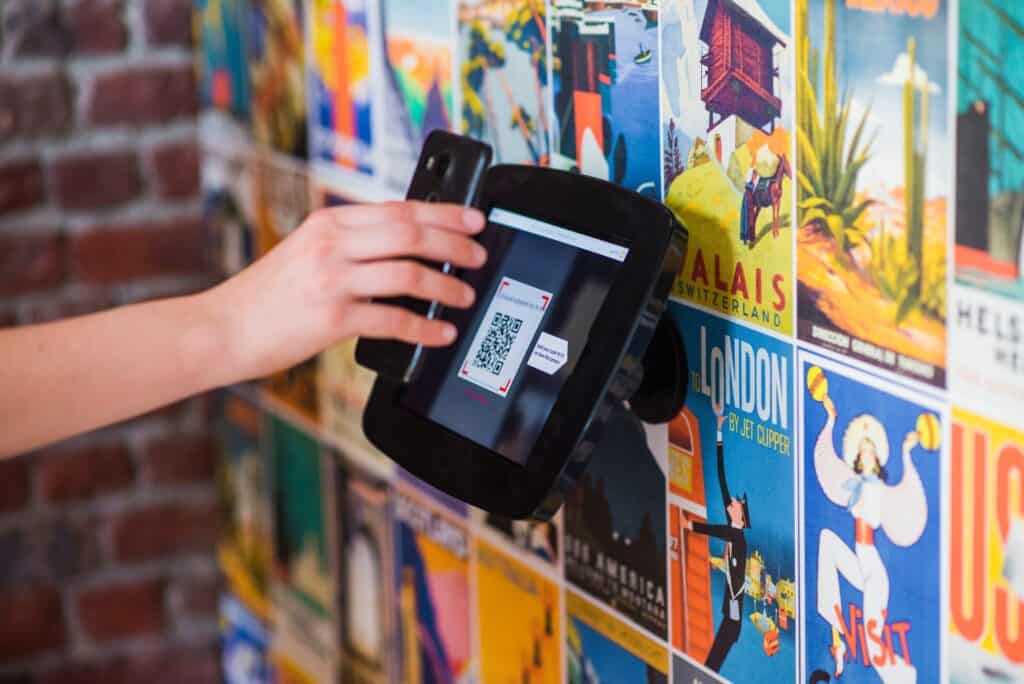
- Kiosks. A kiosk is a standalone electronic device that allows guests to access services and information from a touchscreen. In a hotel, kiosks can give guests a self-service option for check-in, from which they can access door codes, verify documents, and/or make payments.
- Lockboxes. A lockbox is a compact, secured container used to store property keys. However, they are more commonly used for Airbnb vacation rental self check-in than at hotels.
Advantages of contactless check-in
Many hoteliers find that enabling contactless check-in brings a range of advantages:
- Convenient for both staff and guests – no more queueing or authorizing IDs at the front desk
- Gives guests total flexibility to check-in before they arrive and freedom to head straight to their room upon arrival
- Reduces staff time at the front desk, freeing them to focus on guest service
- Increases security – there’s no risk of physical key losses or theft, and access codes can be updated with each new booking to help prevent unauthorized entry
- Helps address labor shortage issues – self-service options place less burden on the front desk, allowing you to use your existing resource more efficiently.
What are the challenges of contactless check-in for hotels?
To reap the benefits of contactless check-in, you need to plan carefully. Start by thinking about the elements of your operations and technology that will change and how to navigate those changes with minimal friction to your everyday operations.
One common reservation hoteliers have around ‘no-contact’ check-in is that reducing face-to-face interaction seems at odds with what hospitality is all about. However, below we cover how you can introduce high-touch interactions into your contactless check-in solution through automated communications.
Remember: Your goal is to make sure you communicate your check-in process to guests before they arrive, and do it in your own words to avoid any confusion.
The other critical thing to sort out before you set up your hotel’s contactless check-in solution is making sure you’ve picked the right hardware and software combination for the job.
For example, going from traditional door locks to smart locks may require an upgrade or some minor updates, depending on your existing locks and your chosen smart lock provider. Additionally, you may need to install one or more self check-in kiosks. In short, be prepared to do some research and planning.
How to prepare your guests for a contactless hotel check-in system
Nothing sets guests at ease more than having a clear understanding of what to expect from their stay. So, you should set the scene immediately when you receive a booking.
- If you receive a direct booking, make sure that your confirmation includes your check-in instructions.
- If you receive an OTA booking, make sure you reconfirm all details, including check-in instructions, in your own words.
At first, most of the guest relationship building will likely happen through emails and/or text messages. So, it’s important you have property management software (PMS) that handles the basics of guest relationship management.
A strong PMS allows you to nurture your guests through automated, personalized communications, giving you the ability to send timely messages automatically throughout the booking journey, containing the right information and your brand’s tone of voice.
You may feel nervous about letting people through your doors without meeting them first. Put your mind at rest by collecting all the necessary information upfront:
- Ask your guests to fill out a simple registration card ahead of time. It is best to ask them as soon as they have made their booking. If they do not respond, ask again a few days before arrival.
- Request that guests then reconfirm ‘on the day’ as they make their way to you. If there is any disruption to their journey, they will be able to let you know.
eviivo Suite™ gives you the ability to automate the above exchanges as part of an end-to-end contactless check-in solution.

Key steps to unlock a smooth contactless check-in process
Nothing makes a worse first impression than a stressful arrival! Ensure that the moment a guest arrives, they’re able to get into their room as smoothly as possible. This means no queue, no complications, easy-to-understand instructions, and simple yet secure room access.
Here are the basic steps you should take to set up your hotel’s seamless self check-in process:
Select your hotel’s smart locks
Whatever type of check-in model and system you’re going to set up, you’re going to need smart locks. However, you have options here, which include replacing your existing locks or upgrading them with the right solution. In either case, make sure that your door hardware is compatible with the contactless system you install.
eviivo’s Device Manager is a smart lock management system that is compatible with a wide range of leading manufacturer brands and integrated into the award-winning hotel PMS, eviivo Suite. It centralizes the management of your hotel’s smart locks in one device dashboard, enabling you to generate and send time-sensitive door codes to guests automatically with each new booking.
Pick your check-in method and tools
What do you want the check-in process to be for your guests? This is the time to decide whether you install kiosks in your lobby or allow guests to check-in online via their smart devices.
If you opt for the latter, then consider whether you:
- Want guests to download an app to their phone
- Prefer to send access codes and instructions via email or SMS/WhatsApp
Connect your PMS to your check-in technology and tools
Integrating your smart lock and/or kiosk technology and check-in platform with your PMS makes everything easier for you and your guests. By connecting the guest and booking data in your PMS to your check-in solution, you’re typically able to automatically issue secure door codes to guests at the right time pre-arrival.
eviivo Suite: the best contactless check-in solution
eviivo Suite gives you full contactless check-in hotel options and the ability to automate many of the key guest communications outlined above, including booking reconfirmation emails.
You can also integrate advanced check-in solutions from our specialist partners. Here’s a rundown of the contactless check-in hardware and software solutions that integrate with eviivo Suite for frictionless self check-in.
Smart lock and mobile key providers
eviivo Suite connects to a wide range of market-leading smart locks and mobile key solutions. There are three forms of integration at play, all of which unlock a seamless contactless check-in process:
- Connections via Device Manager: eviivo’s Device Manager supports a wide range of smart lock brands, centralizing all devices and manufacturer brands in a single device dashboard. Find the full list of compatible smart lock brands here.
- Indirect connections: eviivo connects to Operto and RemoteLock, two leading providers of smart technology solutions. These connections allow you to integrate smart locks from leading providers, such as Yale, Schlage and August, as part of your contactless check-in system.
Guest experience software solutions
eviivo Suite integrates with the below guest experience software options to support contactless check-in.
Self check-in kiosk providers
eviivo Suite also integrates with leading providers of self-service kiosks for hotel check-in.
Conclusion
Contactless check-in is quickly becoming a core expectation for today’s travelers. By automating access and removing unnecessary friction at arrival, hoteliers can streamline operations, improve security, and deliver the flexibility today’s guests demand.
eviivo’s Device Manager lets you take this experience even further. Integrated directly into eviivo Suite, it automatically generates and sends secure access codes to guests according to your preferences, while giving you full remote control of smart locks across your hotel business – all from a single dashboard.
eviivo also integrates with a wide range of third-party technology providers to ensure you have the right mix of hardware and software to support a seamless self check-in for any guest.
Contactless Check-in for Hotels 2026: Solutions & Integrations
Key Takeaways
- Hotel contactless check-in allows your guests to access their room without having to collect a room key or check in at the front desk.
- Setting up a contactless check-in system requires some combination of software (digital check-in solutions, guest messaging software) and hardware (smart locks, keypads, lockboxes, kiosks).
- Communicate your check-in process to your guests in your own words before they arrive to nurture them remotely and create a great check-in experience.
- Use automated, personalized communications to send timely messages to guests throughout the booking journey, and create positive interactions while saving valuable time.
- eviivo Suite offers hotel contactless check-in options through its integrated remote lock and guest management feature sets, in addition to third-party integrations with specialist partners.
 You might also be interested in…